Guide10 min read7 sources
How to disclose Claude Code or Codex use in a research paper
Write the AI-use statement for Claude Code or Codex from a count of what it recorded, in Elsevier's, Springer Nature's or ICMJE's form, with Papex Logbook.
An AI-use statement is usually written at the end of a project, from memory. That works for a chatbot that polished a paragraph. An agent such as Claude Code or Codex can spend weeks in a research folder, reading files, running analyses and rewriting code. By the time you write the Methods section it may have taken thousands of steps, and nobody remembers them all.
Journals now ask for more than one sentence. Elsevier's policy says that where AI tools are used "as part of the research process rather than manuscript preparation, this use should be described in detail in the Methods section", and that "if requested by editors, authors should be able to provide documentation of their use of AI tools".1 ICMJE asks authors to describe how they used AI "in both the cover letter and the submitted work".2
Today we are releasing Papex Logbook, a free tool for Claude Code and Codex. While the agent works in a research folder, the app's hooks write a logbook of each step. When you write the paper, the statement is counted from that logbook and printed in your publisher's own form. A reviewer who receives the logbook file can check the count at papex.org/verify, without an account.
What the logbook keeps#
Claude Code and Codex both run small programs called hooks at fixed moments: when you send an instruction, before and after each tool call, and when a turn ends.34 Logbook writes a line at those moments. The lines are written as the work happens, so the record does not rest on the model's own account of it.
The logbook is one file in your folder, .papex-log/log.jsonl. Each line is one event and carries the fingerprint (SHA-256) of the line before it, so the lines form a chain. For work in that folder it keeps:
- each tool step, with its time and the model the app names;
- shell commands, with anything that looks like a secret removed;
- the paths and fingerprints of the files that changed while each step ran;
- each instruction you typed, as its time, its length and a salted fingerprint.
It does not keep the text of your instructions, file contents or tool output. Text that a command writes in line, such as echo "…" > notes.txt, stays as part of the command. Web searches and addresses stay out unless you turn them on (Codex's own web search is not visible to hooks). The file stays on your computer, needs no Papex account, and git ignores it.
Turn it on#
Install the Papex plugin. In Claude Code:
/plugin marketplace add papexlabs/papex-claude-plugin
/plugin install papex@papexlabs
In Codex:
codex plugin marketplace add papexlabs/papex-claude-plugin
codex plugin add papex@papexlabs
Codex asks you once to review and trust the plugin's hooks (/hooks in the terminal, Review hooks in the app). Nothing is recorded until you do.
When research work begins in a folder, or when you type /papex:logbook in Claude Code or ask Codex for the logbook, the agent asks once, with three answers:
- On, with timestamps. The logbook's fingerprint goes to Papex now and then, and the logbook gets a public page of those times (more below).
- On, on this computer only. Nothing goes to Papex from the logbook itself. If the agent prepares a Papex draft for you, the counted line goes with it for your review.
- No. Nothing runs, and the agent does not ask again in that folder.
Recording starts with the next step. Without the plugin, run one command in your research folder (add --host codex for Codex, or --host both):
npx @papexlabs/logbook start
It needs Node.js 22.12 or newer. So far it has been tested on macOS.
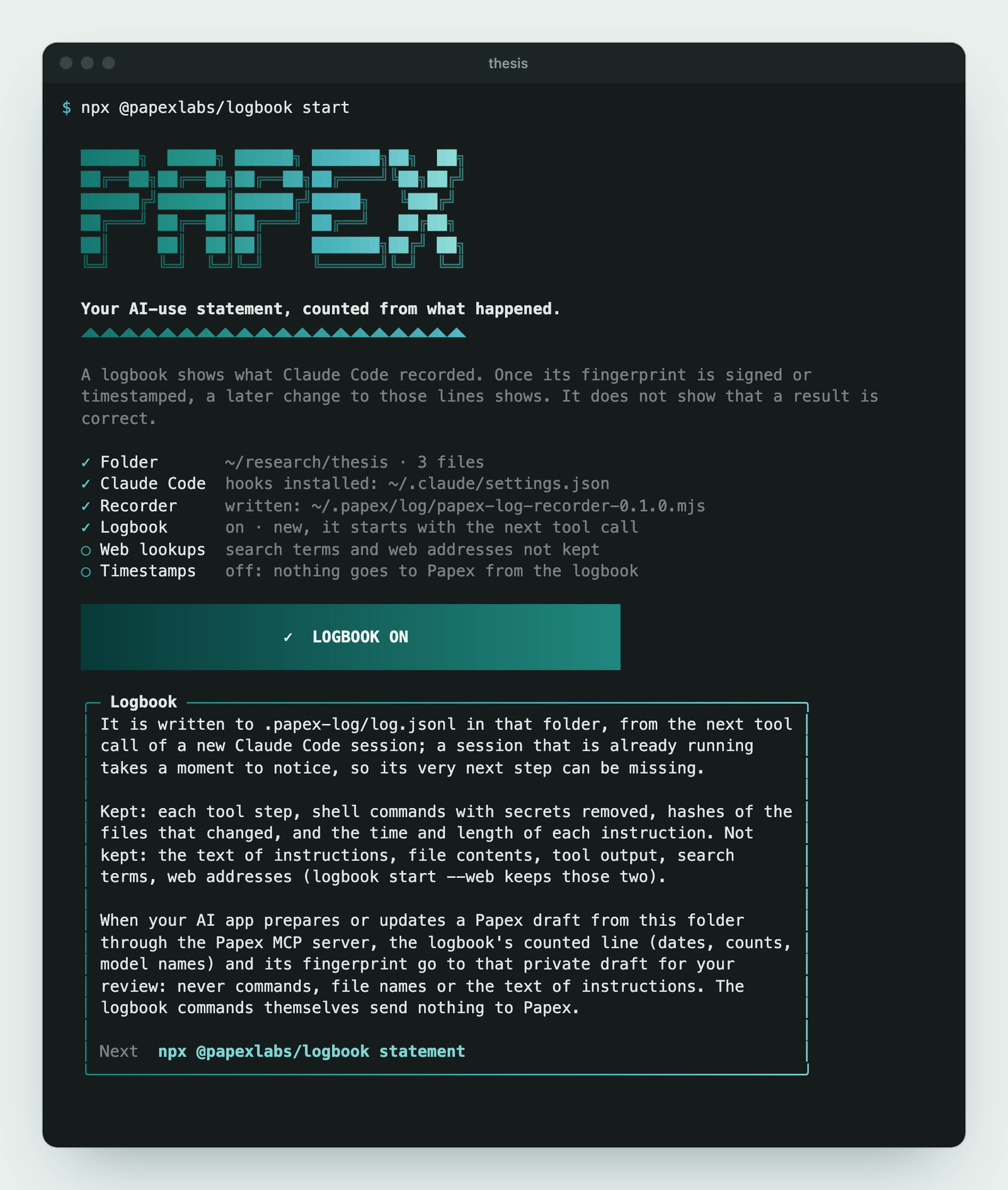
logbook start in a terminal. The logbook is on from the next step; nothing goes to Papex unless timestamps are turned on.The statement, in your journal's form#
When you write the paper, ask the agent: "the logbook statement for Elsevier". Or run this in your research folder:
npx @papexlabs/logbook statement --for elsevier
Without --for, the same command draws the whole count: steps by tool and by model, sessions, files and the chain head. Here is one day of the logbook behind one of our own reports:
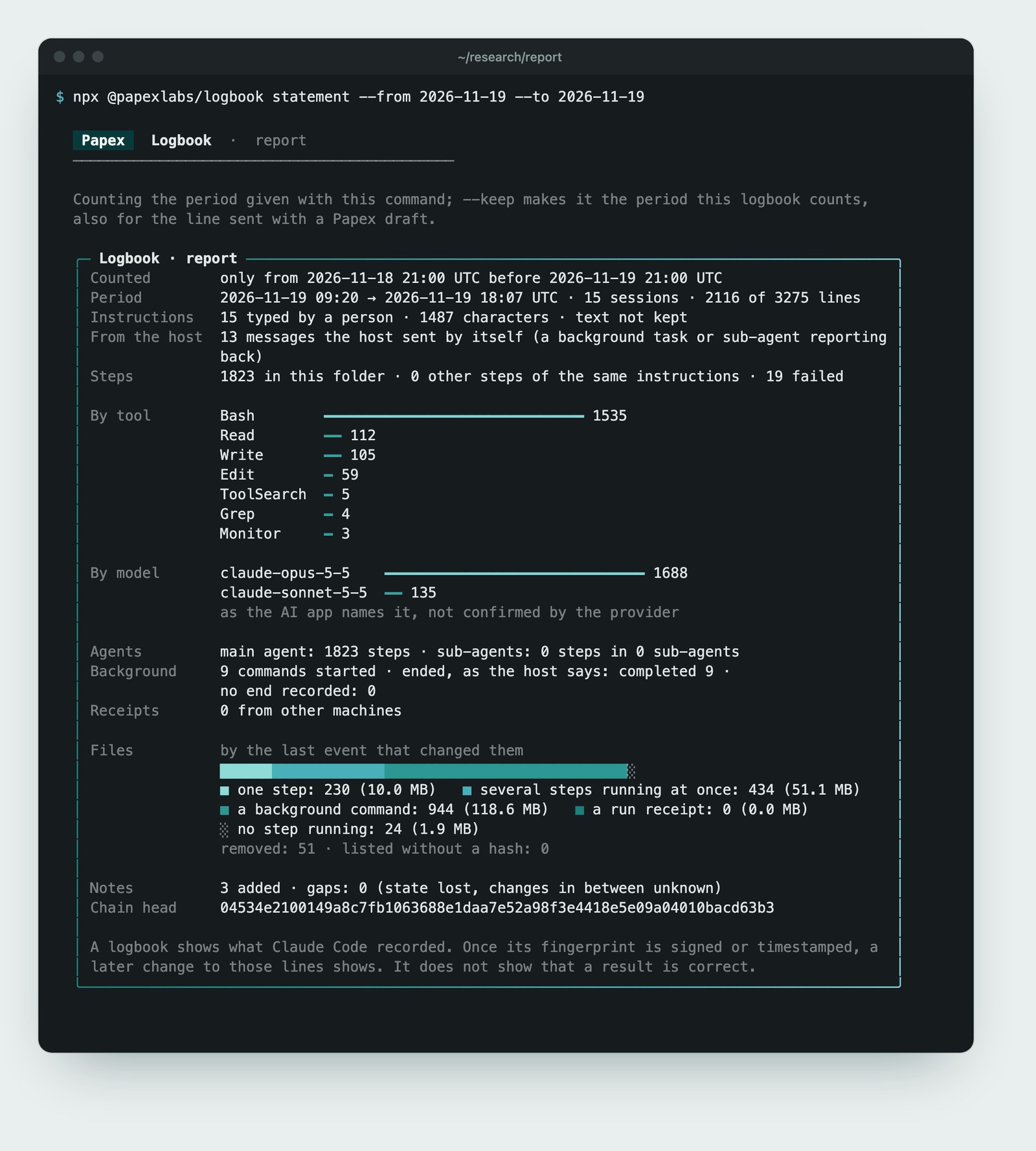
With --for elsevier, the same day prints this block, ready for the Methods section (the fingerprint is shortened here):
Goes in: Methods. The author(s) used Claude Code to carry out the investigation and write code. Papex Logbook counted the steps Claude Code recorded while it worked: "Part of a logbook, 2026-11-18 21:00 to 2026-11-19 21:00 UTC: 1823 tool steps (19 failed), 15 instructions. Models: claude-opus-5-5 1688, claude-sonnet-5-5 135." Work record SHA-256 0x04534e21…acd63b3; the logbook file is available from the author(s) and can be checked against it at papex.org/verify.
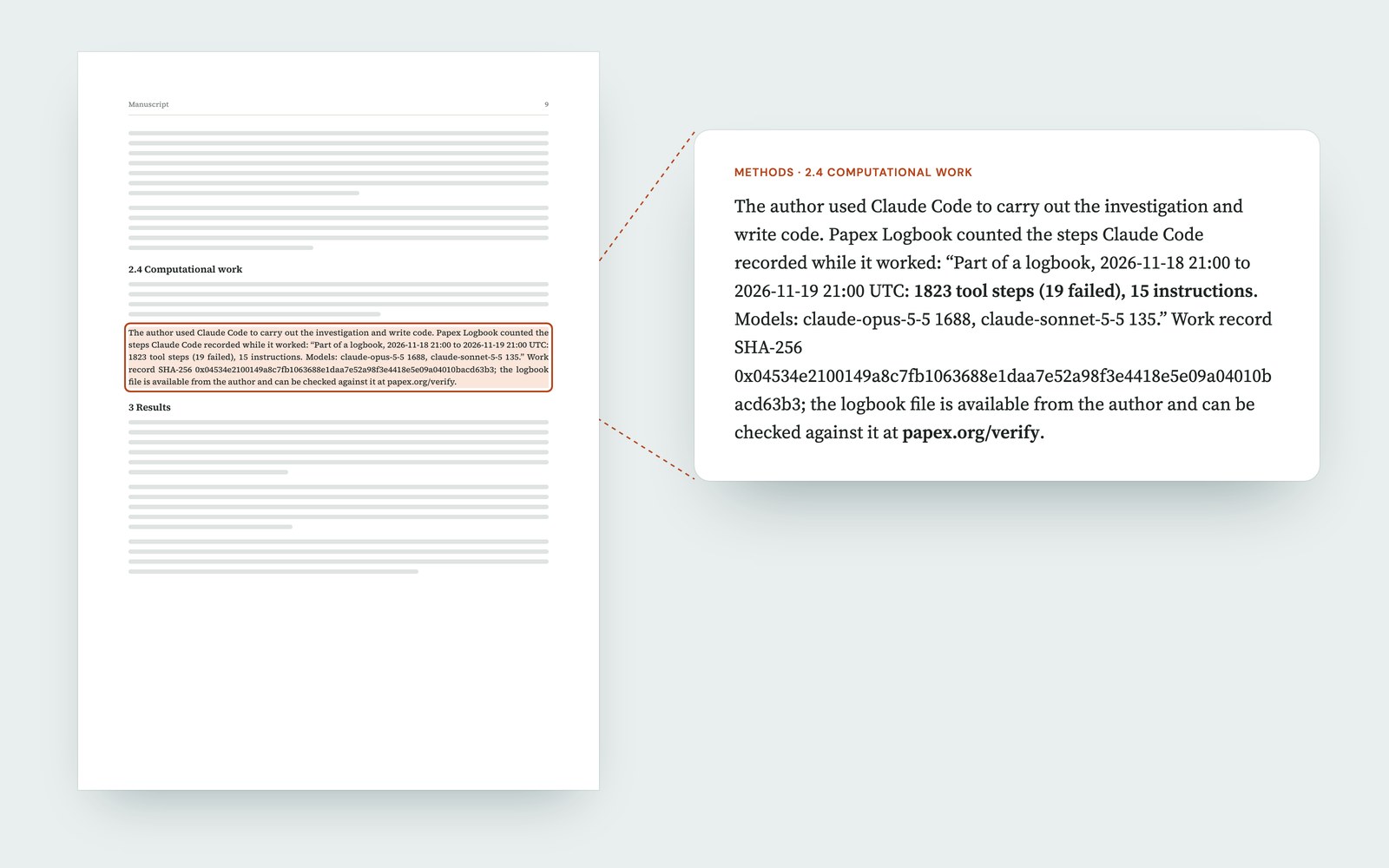
The statement names the app that recorded the steps: Claude Code, Codex, or "Claude Code and Codex" when both worked in the folder. The quoted note is the count. If the logbook was turned off with its stop command, the note says so ("off 1×"); each stop and restart writes a line. The work record is the fingerprint of the logbook's last line when you counted it. The roles are CRediT roles that you choose, such as --roles investigation,software. Without them, the purpose stays [in brackets] for you to fill in. Writing roles go to the publisher's AI declaration or the Acknowledgments, and the others to the Methods. Each block says where in the manuscript it goes.
The count does not replace your own description of what the AI did. Write that in your words next to it: which analyses it ran, which code it wrote, what you checked. The count adds the scale, the period and the models.
| Publisher or guideline | --for |
|---|---|
| General (ICMJE, COPE) | general |
| Elsevier | elsevier |
| Springer Nature | springer-nature |
| Wiley | wiley |
| Taylor & Francis | taylor-francis |
| IEEE | ieee |
| ACM | acm |
| arXiv, AMS | arxiv-ams |
statement --for prints, each following that publisher's AI policy as checked on 26 November 2026.If one folder holds more than one paper, count one period: --from 2026-11-11 --to 2026-11-25. The note then starts "Part of a logbook" and names the period's exact bounds in UTC, so anyone can count the same lines again. Papers worked on in the same days cannot be told apart this way.
Without Logbook, write the same parts by hand: the app and the models, what they did, over which period, and what you checked. Our guide on how to write an AI disclosure statement has examples and eleven journal policies.
How a reader checks it#
A reviewer or editor who wants to check the statement asks you for the logbook file. They open papex.org/verify, drop the file and paste the statement. The page reads the file in their browser; the file is not uploaded. To show timestamps, it asks Papex for that logbook's id only. It runs four checks:
- Chain intact. Every line carries the fingerprint of the line before it. A changed, removed or inserted line breaks the chain, and the page names the first line where it breaks.
- Work record found. The statement's fingerprint is one of the logbook's lines. Lines written after it are named and left out of the count.
- Same numbers as the note. The page counts steps, failed steps, instructions, models, dates and the times the logbook was turned off, over those lines, and compares them with the quoted note. A difference shows row by row.
- Existed by a time. If the logbook was timestamped, the page shows the earliest time Papex received the fingerprint of that line or a later one, and whether its Bitcoin proof is confirmed.
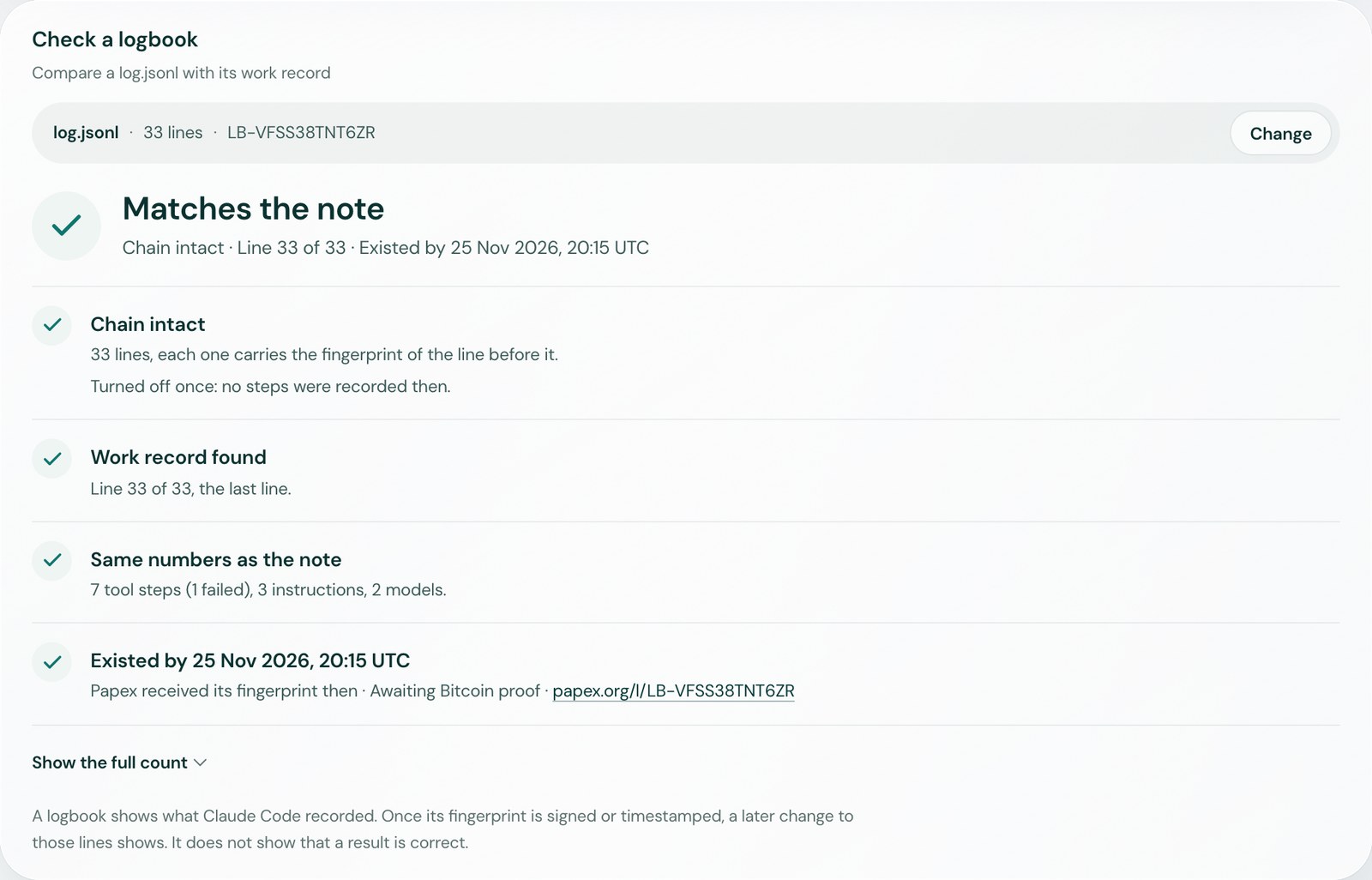
A matching check shows that the file and the statement agree. On its own, the chain cannot show when the file was written: the whole file could be rewritten and every fingerprint computed again. A fingerprint kept somewhere else fixes it. The statement in a submitted manuscript fixes the logbook from the day you submit. Timestamps taken while you work fix each part of it as it is written.
The logbook names shell commands and full paths, which can name you. For a double-blind review, send it through the editor.
A reviewer can also check a logbook without our page. The format is written down in FORMAT.md, and verify_logbook.py, a single Python file with no dependencies, runs the first three checks from the command line. Both are open source under the Apache License 2.0, at github.com/papexlabs/logbook-format6.
Timestamps, if you want them#
Timestamps are off unless you turn them on. With them on, about every 30 minutes while you work, and once at each statement, the logbook sends Papex:
- the fingerprint of its first line, and that line itself, which holds no files or paths;
- the fingerprint of its last line, its line count and the last line's time;
- the app's name and Logbook's version;
- a hash of the logbook's claim file, so Papex knows the send comes from its owner.
No commands, file names, notes or account. Papex keeps each fingerprint with the time it arrived and submits it to Bitcoin through OpenTimestamps5. The logbook gets a public page, papex.org/l/LB-…, that lists those times. Anyone can open it without the file or an account, and download each Bitcoin proof once it is confirmed. The statement then adds one sentence: "The logbook was timestamped while the work went on: papex.org/l/LB-…".
Each timestamp shows that the lines up to it existed by that time. A logbook rebuilt afterwards would not match them, up to the last timestamp. For what a Bitcoin timestamp shows, see How OpenTimestamps works.
Timestamps and signed statements need the logbook's claim file. Each new logbook gets a random secret in .papex-log/claim, and Papex accepts a timestamp or a statement for that logbook only with proof of it. Someone who has the log file alone can check it, but can do neither. Keep the claim file private.
Your name on it#
The first statement on your computer asks once whether you want your name on it. If you say yes, Claude prepares a logbook statement on Papex: the counted line, the logbook's fingerprint and its claim, so Papex can tie the statement to that logbook. You sign in, read it, choose the roles and sign. The signed statement then shows on the logbook's page with the name on your Papex account. Your paper does not need to be on Papex, and no file of the work goes with the statement. If you say no, Claude does not ask again, and you can still sign one later.
What a logbook does not show#
A logbook shows what the AI app recorded. Once its fingerprint is signed or timestamped, a later change to those lines shows. It does not show that a result is correct.
- It is kept on your computer, by software you run. A check shows that the file and the statement agree. It cannot show that the file holds every session of the work.
- It holds what Claude Code or Codex did in that folder. Work in other tools, on other computers or by hand is not in it, and a session opened in a folder above it is not recorded.
- A pause made with the stop command shows as a line. Hooks turned off in other ways leave no line.
- Model names are what the app reports. The model's provider does not confirm them.
- A Codex tool that fails usually reports no end, so its step counts as unfinished, not as failed.
- A count of steps describes how the work went. It does not measure who contributed what.
- A signed statement is its signer's own. Papex does not check who did the work.
Licence#
Logbook is free to use. The recorder, the npm package @papexlabs/logbook7, is under the Functional Source License (FSL-1.1-ALv2): you may use it for any purpose other than a competing use, and each version becomes Apache 2.0 two years after its release. The format and the checker are Apache 2.0 from the start, so anyone can read and check a logbook without us.
Sources#
- Elsevier. "Generative AI policies for journals." Updated June 2026. Checked 26 November 2026. https://www.elsevier.com/about/policies-and-standards/generative-ai-policies-for-journals ↩
- ICMJE. "Use of AI by Authors." Recommendations for the Conduct, Reporting, Editing, and Publication of Scholarly Work in Medical Journals. Checked 26 November 2026. https://www.icmje.org/recommendations/browse/artificial-intelligence/ai-use-by-authors.html ↩
- Anthropic. "Hooks reference." Claude Code documentation. Checked 26 November 2026. https://code.claude.com/docs/en/hooks ↩
- OpenAI. "Hooks." Codex documentation. Checked 26 November 2026. https://developers.openai.com/codex/hooks ↩
- OpenTimestamps. https://opentimestamps.org ↩
- Papex Labs. "Papex Logbook: format and checker." Apache License 2.0. https://github.com/papexlabs/logbook-format ↩
- Papex Labs. "@papexlabs/logbook." npm. https://www.npmjs.com/package/@papexlabs/logbook ↩